---
title: "API: listUsers"
slug: "api-listusers"
tags: ["home groups"]
updated: 2026-03-17T16:14:50Z
published: 2026-03-17T16:14:50Z
canonical: "support.smarteru.com/api-listusers"
---
> ## Documentation Index
> Fetch the complete documentation index at: https://support.smarteru.com/llms.txt
> Use this file to discover all available pages before exploring further.
# API: listUsers
- SmarterU requires all API calls to POST to HTTPS. Any POST to HTTP will result in the SU:01 error (i.e., No POST data detected.).
- If you are viewing the help in a language other than English, please change your language to English before copying and pasting any code. All API attributes and functions are in English.
- Tags are required unless specified.
## Description
The listUsers method retrieves [users](/v1/docs/users) that meet the specified filters.
## Who Has Access
The following users have access to the listUsers method:
- Users with the [Group Manager](/v1/docs/group-permission-group-manager-gm), [Manage Group Users](/v1/docs/group-permission-manage-group-users-mgu), or [Manage Users](/v1/docs/group-permission-manage-users-mu) group permission.
- [Supervisors](/v1/docs/user-profile-information#supervisors), if the [account's **Supervisor Access** setting's](/v1/docs/account-settings#supervisor-access)*View Supervisees* or *Edit Supervisees* option is checked.
- [Administrators and owners](/v1/docs/user-profile-information#access-level).
## API Call XML Package
```markup
listUsers
- AND/OR -
- AND/OR -
```
## User Tag Group
The User tag group is a container for how the response is returned and the user filters.
```markup
- AND/OR -
- AND/OR -
```
The User tag may contain the following tags.
### Page (optional)
The page number to return. The default is *1*.
### PageSize (optional)
The maximum number of users to return. If the PageSize tag is not provided, up to 50 results are returned by default. The maximum allowed value is 1000.
### SortField (optional)
The field used to sort the results:
- *Name* - The results will be sorted by user names.
- *Employee_ID* - The results will be sorted by employee IDs.
### SortOrder (optional)
The direction that the results will be sorted:
- Asc - The results will be sorted in ascending order.
- *Desc* - The results will be sorted in descending order.
The default is *Asc*.
### Filters
A container for user filters. Refer to [Filters Tag Group](/v1/docs/api-listusers#filters-tag-group).
## Filters Tag Group
The Filters tag group is a container for user filters.
```markup
- AND/OR -
- AND/OR -
```
The Filters tag may contain the following.
### Users (optional)
A container for user filters. Refer to [Users Tag Group](/v1/docs/api-listusers#users-tag-group).
### HomeGroup (optional)
The [home group's name](/v1/docs/home-groups).
### GroupName (optional)
The [group's name](/v1/docs/user-group-permissions).
### UserStatus (optional)
The [user's status](/v1/docs/user-login-information#status):
- *Active*
- *Inactive*
- *All*
The default is *All*.
### CreatedDate (optional)
A container for the user's creation date range.
```markup
```
The CreatedDate tag contains the following.
| Tag | Description |
| --- | --- |
| **CreatedDateFrom** | The first date to include in the date range filter. |
| **CreatedDateTo** | The last date to include in the date range filter. |
- Only one CreatedDate filter can be specified.
- If both a CreatedDate filter and a ModifiedDate filter are specified, the method will return all users that were created within the created date range OR modified within the modified date range. For example, if a user was created within the created date range, but their modified date is outside the modified date range, the user will be included.
### ModifiedDate (optional)
A container for the user's last [updated](/v1/docs/editing-a-user-manually) date range.
```markup
```
The ModifiedDate tag contains the following.
| Tag | Description |
| --- | --- |
| **ModifiedDateFrom** | The first date to include in the date range filter. |
| **ModifiedDateTo** | The last date to include in the date range filter. |
- The dates should be in dd-mmm-yyyy format.
- Only one ModifiedDate filter can be specified.
- If both a CreatedDate filter and a ModifiedDate filter are specified, the method will return all users that were created within the created date range OR modified within the modified date range. For example, if a user was created outside the created date range, but their modified date is within the modified date range, the user will be included.
##
### Teams (optional)
A container for the teams that a user is assigned to.
```markup
```
Each team is contained in a TeamNames tag and contains the following.
| Tag | Description |
| --- | --- |
| **TeamName** | The team's name. |
- At least one TeamName filter must be specified.
- Specifying multiple TeamName filters will be evaluated using the OR operator.
### CustomFields (optional)
A container for the custom user field values specified for a user. Refer to [CustomFields tag group](/v1/docs/api-listusers#customfields-tag-group).
## Users Tag Group
The Users tag group is a container for user filters.
```markup
- AND/OR -
- AND/OR -
```
Each user filter is contained in a UserIdentifier tag and may contain the following.
- You must specify at least one of these tags.
- Specifying multiple UserIdentifier tags will be evaluated using the OR operator.
- Specifying multiple filters in a UserIdentifier tag will be evaluated using the OR operator.
### Email
A container for the user email address filters.
```markup
```
The Email tag contains the following.
| Tag | Description |
| --- | --- |
| **MatchType** | Indicates how the filter will be applied: - *Exact* - The email address must be an exact match to the filter value provided. - *Contains* - The email address must contain the filter value provided. |
| **Value** | The user's email address. |
### EmployeeID
A container for the user employee ID filters.
```markup
```
The EmployeeID tag contains the following.
| Tag | Description |
| --- | --- |
| **MatchType** | Indicates how the filter will be applied: - *Exact* - The employee ID must be an exact match to the filter value provided. - *Contains* - The employee ID must contain the filter value provided. |
| **Value** | The user's employee ID. |
### Name
A container for the user names.
```markup
```
This tag contains the following.
| Tag | Description |
| --- | --- |
| **MatchType** | Indicates how the filter will be applied: - *Exact* - The user name must be an exact match to the filter value provided. - *Contains* - The user name must contain the filter value provided. |
| **Value** | The user's name. |
## CustomFields Tag Group
The CustomFields tag group is a container for the custom user field values specified for a user.
```markup
```
Each custom user field filter is contained in a CustomField tag and contains the following.
### CustomFieldName
The [custom user field's name](https://support.smarteru.com/docs/account-custom-user-fields#name).
### CustomFieldValue
The value of the custom user field. To specify the value for a [hierarchical custom user field](https://support.smarteru.com/docs/account-custom-user-fields#adding-levels-and-values-to-a-hierarchical-custom-user-fields), separate each level's value with a greater than symbol (>). For example, suppose you have the following levels and values for the Place of Birth hierarchical custom user field.
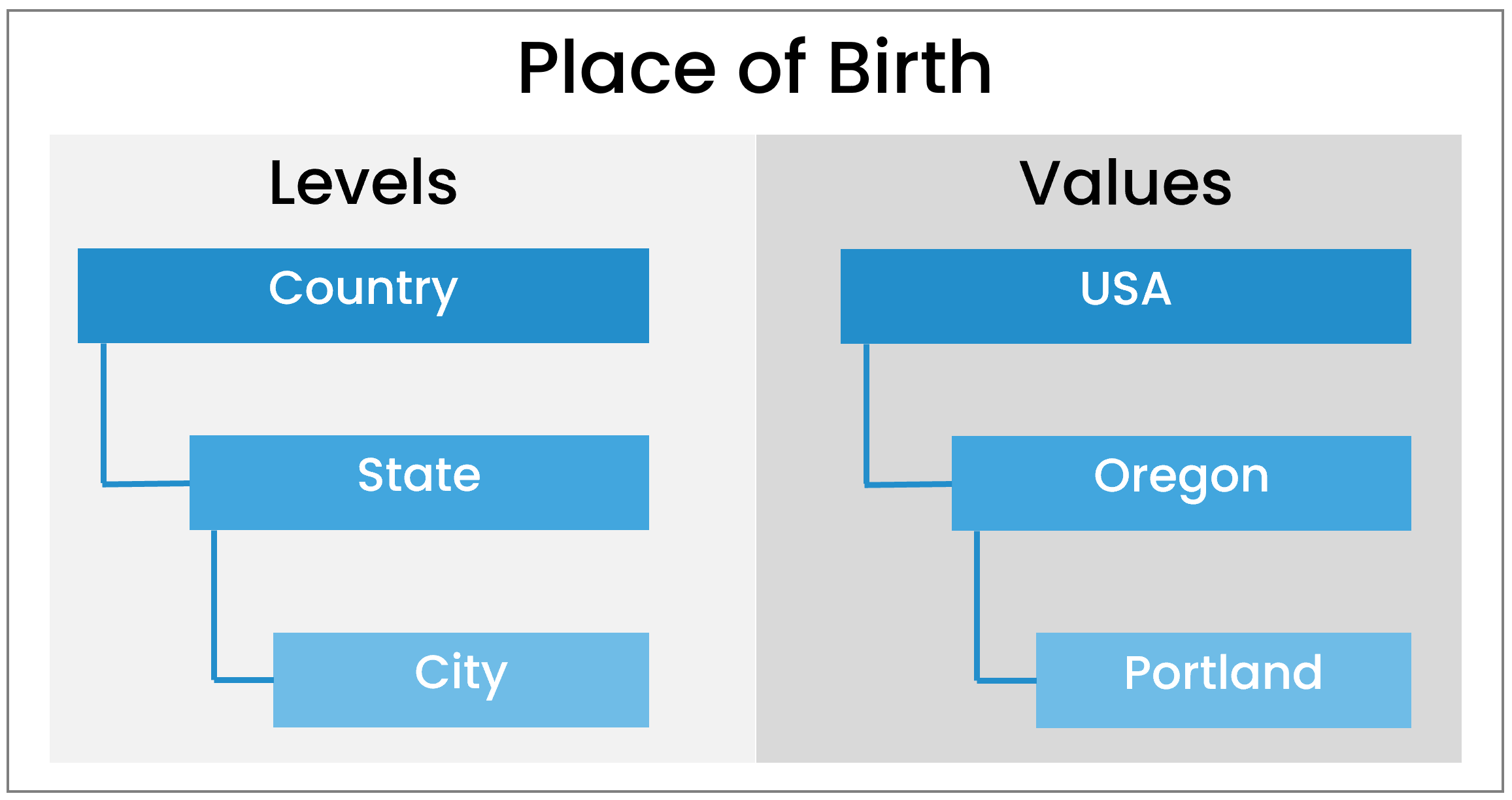
The following would filter the City level of the custom user field for the value *Portland*.
```markup
Oregon>Portland]]>
```
## API Response XML Package
The [API response XML package](/v1/docs/api-response-xml-package) will always include a Result, Info, and [Errors](/v1/docs/api-listusers#error-codes) tag.
```markup
<![CDATA[]]>
```
The Users tag is a container for the users returned by the listUsers method. Each user is contained in a User tag and may contain the following.
### ID
The user's system-generated identifier.
### Email
The [user's email address](https://help.smarteru.com/user-login-information$setting_primary_email).
### EmployeeID
The [user's employee ID](https://help.smarteru.com/user-login-information$setting_employee_id).
### GivenName
The [user's first name](https://help.smarteru.com/user-login-information$setting_given_name).
### Surname
The [user's last name](https://help.smarteru.com/user-login-information$setting_surname).
### Name
The user's full name in the format *Surname,FirstName*.
### Status
The [user's status](/v1/docs/user-login-information#status):
- *Active* - The user account may be used to access SmarterU.
- *Inactive -* The user account may not be used to access SmarterU.
### Title
The [user's title](/v1/docs/user-profile-information#title).
### Division
The [user's division](https://support.smarteru.com/v1/docs/user-profile-information#division).
### HomeGroup
The name of the user's [home group](/v1/docs/home-groups).
### CreatedDate
The date the user's account was [created](/v1/docs/adding-a-user-manually).
### ModifiedDate
The date the user's account was last [updated](/v1/docs/editing-a-user-manually).
### Supervisors
A container for the [user's supervisors](https://support.smarteru.com/docs/user-profile-information#supervisors). Each supervisor is contained in a Supervisor tag.
### Teams
A container for the [user's teams](/v1/docs/user-team-information). Each team name is contained in a Team tag.
### TotalRecords
The total number of records returned for all the pages.
### Example API Response XML Package
Below is an example of an API response XML package.
```markup
Success
<![CDATA[Sales Associate]]>
<![CDATA[Director]]>
<![CDATA[HR Specialist]]>
3
```
## Error Codes
| Error Code | Message |
| --- | --- |
| LU:01 | The page number provided is not valid. |
| LU:02 | The group name provided is invalid. |
| LU:03 | The user status provided is invalid. |
| LU:04 | The required permissions are not met to call the listUsers method. |
| LU:05 | The created date provided is not valid. |
| LU:06 | The modified date provided is not valid. |
| LU:07 | The page size provided is not valid. |
| LU:08 | The sort field provided is not valid. |
| LU:09 | The sort order provided is not valid. |
| LU:10 | The email address provided is not valid. |
| LU:11 | The employee ID provided is not valid. |
| LU:12 | The name provided is not valid. |
| LU:13 | The user identifier match type provided is not valid. |
| LU:14 | The user identifier value provided is not valid. |
| LU:15 | The value for the sort field must be NAME or EMPLOYEE_ID. |
| LU:16 | The value for the sort order must be ASC or DESC. |
| LU:17 | User and/or Team filters are exceeding the 2000 filter limit. Remove # User/Team filter(s). |
| LU:18 | The user email match type provided is not valid. |
| LU:19 | The user employee ID match type provided is not valid. |
| LU:20 | The user name match type provided is not valid. |
| LU:21 | The team names provided are not valid. |
| LU:22 | The team name provided is not valid. |
| LU:23 | The home group provided is not valid. |
| LU:24 | A minimum of one custom field must be provided. |
| LU:25 | A custom field name and value must be provided for all custom fields. |
| LU:26 | A custom field name provided is not valid. |
| LU:27 | A custom field value provided is not valid. |
## Related
- [API: createUser](/api-createuser.md)
- [API: getUser](/api-getuser.md)
- [API: getUserGroups](/api-getusergroups.md)
- [API: getUserSubscriptions](/api-getusersubscriptions.md)
- [API: getUserWithRoleDetail](/api-getuserwithroledetail.md)
- [API: updateUser](/api-updateuser.md)
- [Users ](/users.md)