Timeline pages provide a graphical interface for you to view the courses you've completed. This includes active and inactive courses, including those that may no longer be assigned to any of your groups. If your account's points and rewards feature is enabled, you'll also be able to view points you've earned.
The timeline defaults to showing the last three months, but you may change the date range. The selected date range is indicated in the date range filters beside the chart and by the unshaded area in the timeline.
The number of courses you completed within the selected date range is shown to the left of the chart and indicated in the chart by a bar of the same color. You may show or hide the bars by clicking the Course Completions toggle.
The courses completed within the date range are also listed below the bar chart. The listed courses are grouped by completion date. If the course is graded, your grade displays next to the course. You can download your course completion transcript for the courses within the date range.
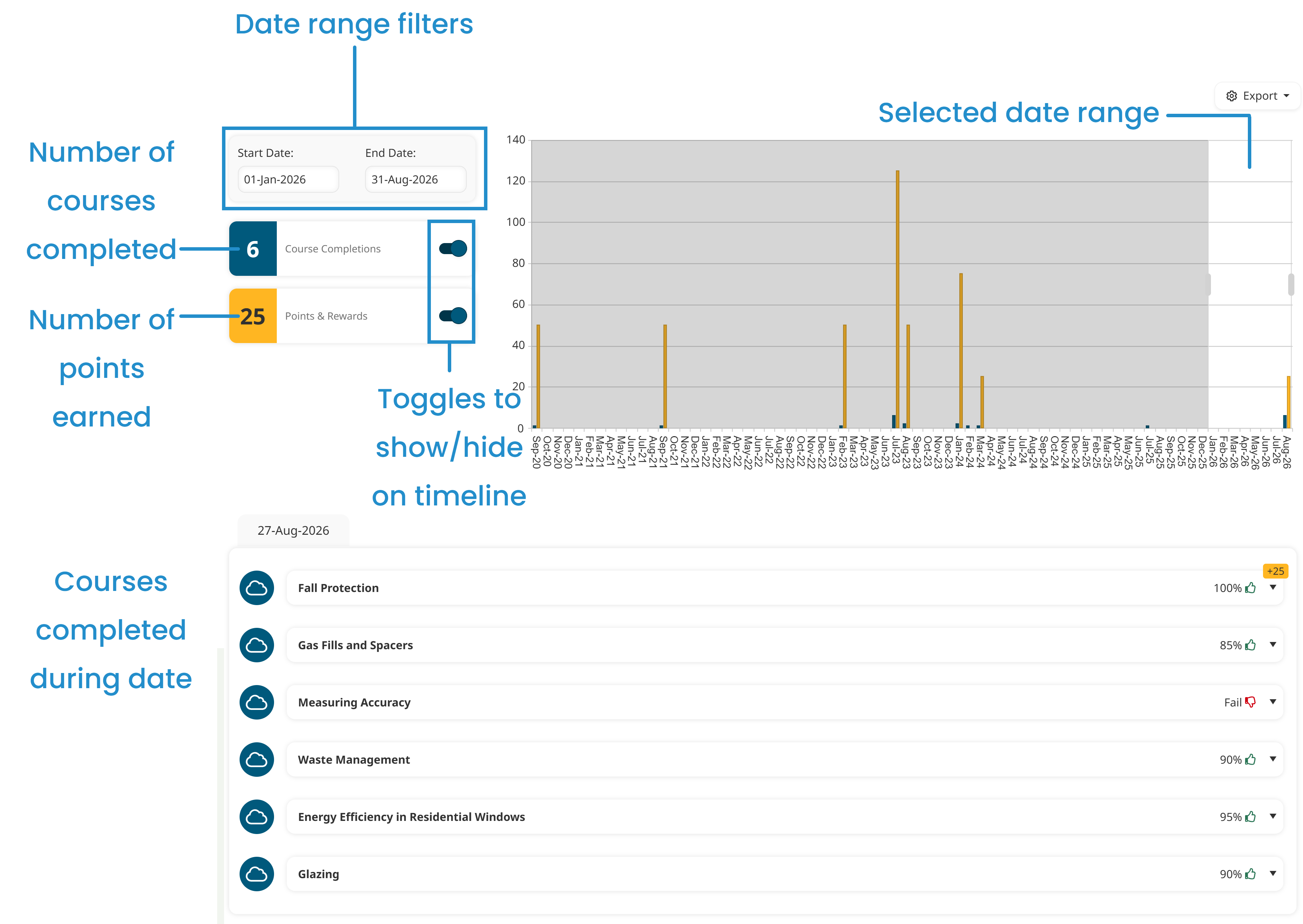
If points and rewards are enabled for your account, the number of points that you earned for completing courses within the selected date range is shown to the left of the chart and indicated in the chart by a bar of the same color. You may show or hide the bars by clicking the Points & Rewards toggle.